PRCloudfindr Index · Productivity Software · ranked by verified buyersUpdated August 2026

Productivity Software

Productivity software is the everyday toolkit that helps individuals and teams get work done — notes and docs, to-dos and tasks, calendars, and the apps that tie them together. In 2026 AI sits at the centre: drafting and summarising, turning notes into tasks, and answering questions across everything you've written.

Whether you want a personal system to stay organised or a shared workspace for your team, the right tool depends on how you work and what you want to bring together. Below, every tool is ranked by verified buyers who actually pay for it — compare features, pricing and reviews to find your fit.

Showing all results
Clear

Every Productivity Software tool below is ranked by verified buyers who actually pay for it — not by vendors, and not by us. 57 tools compared. No sponsored placements in the rankings.

Designed for booksellers, this specialized bookstore POS is the perfect solution for selling books online and managing stock. CirclePos are specialized in bookstores. Whether you are selling new books or second-hand, CirclePOS is for bricks & mortar…

Productivity Software+1Subscription Monthly ($100/mo)
3.76 reviews
See details

LeadMonk is a smart and versatile online appointment scheduling software that gives the flexibility to your customers to book time with you using their mobile number or email address without the back-and-forth messages or emails. Share your availability…

Productivity SoftwareSubscription Monthly ($8/mo)
3.56 reviews
See details

Zoom Meetings offers one of the most popular meeting apps out there. Although they’ve been around for a while (for almost a decade to be more precise), their presence has risen to fame with the unfortunate recent global pandemic. Let’s take a look at wha…

4.06 reviews
See details

As the name suggests, Zoho Writer is simply an online word processing software package, allowing users to write & modify documents online. These can subsequently be saved to the cloud, allowing distribution. So what’s new in this, then? There are man…

3.56 reviews
See details

SAVIOM is a pioneer and global provider of enterprise resource management and workforce planning solutions. Already several years ahead of its competitors, our software is designed to build an optimized workforce, ensure successful project delivery, and…

5.04 reviews
See details

As someone who loves to create beautiful spaces, I was thrilled to discover reimaginehome.ai. This software has truly unlocked creative possibilities for me in redesigning any space to match my vision. One of the most impressive features of reimaginehome…

3.73 reviews
See details

Zoho Docs is an online document management system that allows you to create, store, share, and collaborate on documents in practically any format. Document storage and management, as well as document editing and collaboration, are the two main features o…

Collaboration & Productivity Software+2Subscription Monthly ($5/mo)
3.73 reviews
See details

WorkTrek CMMS helps you to track your work orders and daily tasks, reduce equipment downtime, and improve health and safety procedures on a single cloud platform. WorkTrek is a revolutionary cloud platform designed to revolutionize the efficiency of main…

In today\’s rapidly evolving business landscape, every second counts. Introducing CTK Email Parser, the game-changing app that empowers businesses to revolutionize their email processing and streamline their workflows like never before. With its advanced…

4.51 reviews
See details

Leveraging over 30+ years of domain and operational expertise, Triple Tree digitizes the quality management, production tracking, and color management processes for textile, apparel, and non-apparel supply chains. Our mission is to ensure end-to-end visi…

Productivity SoftwareCustom Pricing
4.51 reviews
See details

DocXter is your new AI-powered bestie who\’s got your back when documents attack. It\’s like an automated knowledge miner, lifeguard, and translator rolled into one convenient platform. Just upload any document, then ask DocXter about it in plain English…

Collaboration & Productivity Software+5Subscription Monthly ($9.99/mo)

Achieve unparalleled precision and accuracy in managing your inventory with our state-of-the-art inventory management system, meticulously crafted by our team of experts. This cutting-edge system is designed to streamline your inventory operations, offer…

Productivity SoftwareSubscription Monthly ($2350/mo)

Krater.ai is a powerful all-in-one AI-powered platform that offers a wide range of applications to generate high-quality, plagiarism-free content quickly and easily. With over 30,000 users and a reputation for being easy to use, cost-effective, and effic…

Cemetery software serves as an indispensable tool in efficiently managing the distinctive aspects of cemetery operations. Tailored to address the specific needs of the industry, these software solutions play a crucial role in organizing and streamlining…

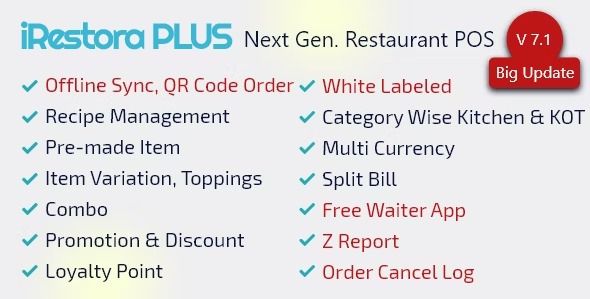
iRestora PLUS is a Restaurant Management Software. Enter iRestora PLUS, a key to managing your restaurant business. It understands your operations and customer satisfaction how important to you. Take a look at the top features of this restaurant manageme…

eCommerce Software+2Custom Pricing ($69/mo)

Process Shepherd was born from a simple premise – that we should not be needing to ask staff to memorise complicated business processes. Removing this pressure off the agent will increase their performance and ability to better focus on their conversatio…

Buyer's Guide

How to choose Productivity Software

What actually matters in 2026, which type fits your team, and how to avoid overpaying — before you shortlist below.

Productivity software covers the everyday tools that keep work organised — notes and docs, tasks and to-dos, calendars, and all-in-one workspaces that combine them. The right choice depends on whether you want a personal system or a shared team hub, and how much you want in one place. This guide covers what these tools do in 2026 and how to choose.

What modern productivity software actually does

These tools help you capture information, organise tasks and find things later. Some focus on notes and writing, some on tasks and projects, and some try to be an all-in-one workspace for docs, tasks and wikis together. In 2026 AI is the common thread: it drafts and summarises, turns meeting notes into action items, answers questions across your own notes, and connects the dots between them. The differentiator is fit — a system you'll actually stick with.

The 2026 features that actually matter

  • Notes and docs — fast capture and clean, flexible writing.
  • Tasks and projects — to-dos, reminders and light project tracking.
  • All-in-one flexibility — docs, tasks and databases in one place when you want it.
  • AI assistant — drafting, summarising and asking questions of your own content.
  • Search — finding anything instantly across everything.
  • Sync and cross-platform — reliable on desktop, mobile and offline.
  • Collaboration and integrations — sharing plus links to your other tools.

Which tool is right for you

  • Personal organisation: a simple, fast app for notes, tasks and reminders.
  • Note-takers and writers: a focused, distraction-free writing and knowledge tool.
  • Teams and knowledge bases: a shared workspace or wiki everyone contributes to.
  • Builders and power users: an all-in-one that flexes into whatever system you design.

What to expect on pricing

Many productivity tools have a genuinely useful free tier for individuals, then charge per user per month for team features, more storage, version history and AI. AI assistants are increasingly a paid add-on. Check whether the features you rely on — and the AI usage you want — sit behind higher tiers, especially once you add a team.

Common pitfalls to avoid

  • Tool overload — juggling too many apps instead of one dependable system.
  • Endless setup — over-flexible tools can eat more time than they save.
  • Lock-in — check you can export your notes and data if you leave.
  • Per-seat costs that add up across a team.
  • Chasing AI features you won't actually use day to day.

Every tool below is ranked by verified buyers who actually pay for it — no sponsored placements. Filter by price, rating and use case, then compare your shortlist to find the system that fits how you work.


FAQ

Frequently asked questions

Common questions buyers ask about this category.

What is productivity software?

Productivity software is the everyday toolkit for getting work done — notes and docs, tasks and to-dos, calendars, and all-in-one workspaces that combine them. Modern tools add AI that drafts and summarises, turns notes into tasks, and answers questions across your own content.

What's the best free productivity app?

Many productivity tools offer capable free tiers for individuals, covering notes, tasks and basic collaboration. Limits usually appear around storage, team features, version history and AI usage. Compare the free options below by rating to find one that fits how you work.

Should I use a note app or an all-in-one workspace?

A focused note or task app is simpler and quicker to adopt, ideal if you want one job done well. An all-in-one workspace combines docs, tasks and databases, which is powerful for teams and power users but takes more setup. Pick based on how much you want in one place versus how fast you want to start.

What can AI do in productivity software?

AI drafts and rewrites text, summarises long notes and meetings, turns notes into action items, and answers questions across everything you've written. It speeds up capture and review, though a system only helps if you actually keep using it.

What's the best productivity tool for teams?

Teams are best served by a shared workspace or knowledge base where everyone can create docs, track tasks and find information, with good search and permissions. Prioritise something the whole team will actually adopt over the most feature-packed option. Compare the team tools below by rating.

How much does productivity software cost?

Many tools are free for individuals, then charge per user per month for team features, more storage, version history and AI. AI assistants are often a paid add-on. Check which features you rely on are gated behind higher tiers, especially once you add a team.

For vendors

List your tool. Reach 32k buyers.

Submit free. Verified vendor badge, claim your reviews, and drive qualified buyers with measurable affiliate links — no pay-to-play in the rankings

List your tool. Reach 32k buyers.